ilogtail+kafka+logstash+elasticsearch
项目背景
基于公司微服务业务,查询日志繁琐问题,搭建日志系统,尝试了Fluentbit,filebeat和Ilogtail,综合对比,本次选择ilogtail作为日志提取器进行日志提取。
参考资料:
GitHub:
https://github.com/alibaba/ilogtail
社区版用户手册:
https://ilogtail.gitbook.io/ilogtail-docs
使用DaemonSet模式采集K8s容器日志:
https://zhuanlan.zhihu.com/p/544079650
如何将业务日志采集到Kafka:
https://zhuanlan.zhihu.com/p/544081167
采集输出在标准错误流的Java异常堆栈(多行日志)。
https://ilogtail.gitbook.io/ilogtail-docs/data-pipeline/input/input-docker-stdout
logstash kafka 插件
https://www.elastic.co/guide/en/logstash/7.4/plugins-inputs-kafka.html
网上个人文章
https://blog.csdn.net/weixin_41934601/article/details/125865098
方案
- 部署 FluentBit 从集群每个节点采集日志
- 推送 kafka 削峰并保存
- 部署 FileBeat 从 kafka 消费日志
- FileBeat 发送日志到 ElasticSearch 并保存
- 部署 Kibana 展示 ElasticSearch 数据
1 | graph LR; |
安装zookeeper
作为Kafka的服务注册中心
安装Kafka
对日志进行削峰填谷
部署ilogtail
-
创建部署iLogtail的命名空间
将下面内容保存为ilogtail-ns.yaml
1
2
3
4apiVersion: v1
kind: Namespace
metadata:
name: ilogtail您也可以直接从下面的地址下载示例配置。
1
wget https://raw.githubusercontent.com/alibaba/ilogtail/main/example_config/start_with_k8s/ilogtail-ns.yaml
应用上述配置
1 | kubectl apply -f ilogtail-ns.yaml |
-
配置ilogtail采集,创建配置iLogtail的ConfigMap
1
2
3
4
5
6
7
8
9
10
11
12
13
14
15
16
17
18
19
20
21
22
23
24
25
26
27
28
29
30
31
32
33
34
35
36
37
38# Copyright 2022 iLogtail Authors
#
# Licensed under the Apache License, Version 2.0 (the "License");
# you may not use this file except in compliance with the License.
# You may obtain a copy of the License at
#
# http://www.apache.org/licenses/LICENSE-2.0
#
# Unless required by applicable law or agreed to in writing, software
# distributed under the License is distributed on an "AS IS" BASIS,
# WITHOUT WARRANTIES OR CONDITIONS OF ANY KIND, either express or implied.
# See the License for the specific language governing permissions and
# limitations under the License.
apiVersion: v1
kind: ConfigMap
metadata:
name: ilogtail-user-cm
namespace: ilogtail
data:
tech_service.yaml: |
enable: true
inputs:
- Type: service_docker_stdout
Stderr: true
Stdout: true
K8sNamespaceRegex: "^(tech-dept)$"
IncludeK8sLabel:
logtool: ilogtail
BeginLineCheckLength: 15
BeginLineRegex: "\\d+-\\d+-\\d+.*"
flushers:
- Type: flusher_kafka
Brokers:
- 192.168.5.31:9092
- 192.168.5.32:9092
- 192.168.5.33:9092
Topic: loky-test-log您也可以直接从下面的地址下载示例配置。
1
wget https://raw.githubusercontent.com/alibaba/ilogtail/main/example_config/start_with_k8s/ilogtail-user-configmap.yaml
应用上述配置:
1
kubectl apply -f ilogtail-user-configmap.yaml
-
部署DaemonSet
1
2
3
4
5
6
7
8
9
10
11
12
13
14
15
16
17
18
19
20
21
22
23
24
25
26
27
28
29
30
31
32
33
34
35
36
37
38
39
40
41
42
43
44
45
46
47
48
49
50
51
52
53
54
55
56
57
58
59
60
61
62
63
64
65
66
67
68
69
70
71
72
73
74
75
76
77
78
79
80
81
82
83
84
85
86
87
88
89
90
91
92
93
94
95
96
97
98
99
100
101
102
103
104
105
106
107
108
109
110
111
112
113
114
115
116
117
118
119
120
121# Copyright 2022 iLogtail Authors
#
# Licensed under the Apache License, Version 2.0 (the "License");
# you may not use this file except in compliance with the License.
# You may obtain a copy of the License at
#
# http://www.apache.org/licenses/LICENSE-2.0
#
# Unless required by applicable law or agreed to in writing, software
# distributed under the License is distributed on an "AS IS" BASIS,
# WITHOUT WARRANTIES OR CONDITIONS OF ANY KIND, either express or implied.
# See the License for the specific language governing permissions and
# limitations under the License.
apiVersion: apps/v1
kind: DaemonSet
metadata:
name: ilogtail-ds
namespace: ilogtail
labels:
k8s-app: logtail-ds
spec:
selector:
matchLabels:
k8s-app: logtail-ds
template:
metadata:
labels:
k8s-app: logtail-ds
spec:
tolerations:
- operator: Exists # deploy on all nodes
containers:
- name: logtail
env:
- name: ALIYUN_LOG_ENV_TAGS # add log tags from env
value: _node_name_|_node_ip_
- name: _node_name_
valueFrom:
fieldRef:
apiVersion: v1
fieldPath: spec.nodeName
- name: _node_ip_
valueFrom:
fieldRef:
apiVersion: v1
fieldPath: status.hostIP
- name: cpu_usage_limit # iLogtail's self monitor cpu limit
value: "1"
- name: mem_usage_limit # iLogtail's self monitor mem limit
value: "512"
- name: default_access_key_id # accesskey id if you want to flush to SLS
valueFrom:
secretKeyRef:
name: ilogtail-secret
key: access_key_id
optional: true
- name: default_access_key # accesskey secret if you want to flush to SLS
valueFrom:
secretKeyRef:
name: ilogtail-secret
key: access_key
optional: true
image: >-
sls-opensource-registry.cn-shanghai.cr.aliyuncs.com/ilogtail-community-edition/ilogtail:latest
imagePullPolicy: IfNotPresent
resources:
limits:
cpu: 1000m
memory: 1Gi
requests:
cpu: 400m
memory: 384Mi
volumeMounts:
- mountPath: /var/run # for container runtime socket
name: run
- mountPath: /logtail_host # for log access on the node
mountPropagation: HostToContainer
name: root
readOnly: true
- mountPath: /usr/local/ilogtail/checkpoint # for checkpoint between container restart
name: checkpoint
- mountPath: /usr/local/ilogtail/user_yaml_config.d # mount config dir
name: user-config
readOnly: true
lifecycle:
preStop:
exec:
command:
- /usr/local/ilogtail/ilogtail_control.sh
- stop
- "3"
livenessProbe:
failureThreshold: 3
httpGet:
path: /liveness
port: 7953
scheme: HTTP
initialDelaySeconds: 3
periodSeconds: 10
successThreshold: 1
timeoutSeconds: 1
dnsPolicy: ClusterFirstWithHostNet
hostNetwork: true
volumes:
- hostPath:
path: /var/run
type: Directory
name: run
- hostPath:
path: /
type: Directory
name: root
- hostPath:
path: /etc/ilogtail-ilogtail-ds/checkpoint
type: DirectoryOrCreate
name: checkpoint
- configMap:
defaultMode: 420
name: ilogtail-user-cm
name: user-config您也可以直接从下面的地址下载示例配置。
1
wget https://raw.githubusercontent.com/alibaba/ilogtail/main/example_config/start_with_k8s/ilogtail-daemonset.yaml
应用上述配置
1
kubectl apply -f ilogtail-daemonset.yaml
部署LogStash
根据调整LogStash过滤条件
在Rainbond中创建配置文件挂载
-
配置文件名称:kafka-logstash-es
挂载路径:/usr/share/logstash/config/kafka-logstash-es.conf
1
2
3
4
5
6
7
8
9
10
11
12
13
14
15
16
17
18
19
20
21
22
23
24
25
26
27
28
29
30
31
32
33
34
35
36
37
38
39
40
41
42
43
44
45
46
47
48
49
50
51
52
53
54
55
56
57
58
59
60
61
62
63
64
65
66
67
68
69
70
71
72
73
74
75
76
77
78
79
80
81
82
83
84
85
86
87
88
89
90
91
92
93
94
95
96
97
98
99
100
101
102
103
104
105
106
107
108
109
110
111
112
113
114
115
116
117
118
119
120
121
122
123
124
125
126
127
128
129
130
131
132
133
134
135
136
137
138
139
140
141
142
143
144
145
146
147
148
149
150
151
152
153
154
155
156
157
158
159
160
161
162
163
164
165
166
167
168
169
170
171
172
173
174
175
176
177
178
179
180
181
182
183
184
185
186
187
188
189
190
191
192
193
194
195
196
197
198
199
200
201
202
203
204
205
206
207
208
209
210
211
212
213
214
215
216
217
218
219
220
221
222
223
224
225
226
227
228
229input {
kafka {
bootstrap_servers => "192.168.5.31:9092,192.168.5.32:9092,192.168.5.33:9092"
topics => ["java-test-log","loky-test-log"]
group_id => "fluentd-test-log"
client_id => "logstash-test"
consumer_threads => 2
decorate_events => true
auto_offset_reset => "latest"
codec => json { charset => "UTF-8" }
}
}
#通过添加filter字段,对原有内容就行提取
filter {
# 提取 content 字段
if [Contents][0][Key] == "content" {
mutate { #新增字段
add_field => ["message","%{[Contents][0][Value]}"]
}
} else if [Contents][1][Key] == "content" {
mutate {
add_field => ["message","%{[Contents][1][Value]}"]
}
} else if [Contents][2][Key] == "content" {
mutate {
add_field => ["message","%{[Contents][2][Value]}"]
}
} else if [Contents][3][Key] == "content" {
mutate {
add_field => ["message","%{[Contents][3][Value]}"]
}
} else if [Contents][4][Key] == "content" {
mutate {
add_field => ["message","%{[Contents][4][Value]}"]
}
} else if [Contents][5][Key] == "content" {
mutate {
add_field => ["message","%{[Contents][5][Value]}"]
}
} else if [Contents][6][Key] == "content" {
mutate {
add_field => ["message","%{[Contents][6][Value]}"]
}
} else if [Contents][7][Key] == "content" {
mutate {
add_field => ["message","%{[Contents][7][Value]}"]
}
} else if [Contents][8][Key] == "content" {
mutate {
add_field => ["message","%{[Contents][8][Value]}"]
}
}
# 提取 time 字段
if [Contents][0][Key] == "_time_" {
mutate {
add_field => ["time","%{[Contents][0][Value]}"]
}
} else if [Contents][1][Key] == "_time_" {
mutate {
add_field => ["time","%{[Contents][1][Value]}"]
}
} else if [Contents][2][Key] == "_time_" {
mutate {
add_field => ["time","%{[Contents][2][Value]}"]
}
} else if [Contents][3][Key] == "_time_" {
mutate {
add_field => ["time","%{[Contents][3][Value]}"]
}
} else if [Contents][4][Key] == "_time_" {
mutate {
add_field => ["time","%{[Contents][4][Value]}"]
}
} else if [Contents][5][Key] == "_time_" {
mutate {
add_field => ["time","%{[Contents][5][Value]}"]
}
} else if [Contents][6][Key] == "_time_" {
mutate {
add_field => ["time","%{[Contents][6][Value]}"]
}
} else if [Contents][7][Key] == "_time_" {
mutate {
add_field => ["time","%{[Contents][7][Value]}"]
}
} else if [Contents][8][Key] == "_time_" {
mutate {
add_field => ["time","%{[Contents][8][Value]}"]
}
}
# 提取 container_name 字段
if [Contents][0][Key] == "_container_name_" {
mutate {
add_field => ["container_name","%{[Contents][0][Value]}"]
}
} else if [Contents][1][Key] == "_container_name_" {
mutate {
add_field => ["container_name","%{[Contents][1][Value]}"]
}
} else if [Contents][2][Key] == "_container_name_" {
mutate {
add_field => ["container_name","%{[Contents][2][Value]}"]
}
} else if [Contents][3][Key] == "_container_name_" {
mutate {
add_field => ["container_name","%{[Contents][3][Value]}"]
}
} else if [Contents][4][Key] == "_container_name_" {
mutate {
add_field => ["container_name","%{[Contents][4][Value]}"]
}
} else if [Contents][5][Key] == "_container_name_" {
mutate {
add_field => ["container_name","%{[Contents][5][Value]}"]
}
} else if [Contents][6][Key] == "_container_name_" {
mutate {
add_field => ["container_name","%{[Contents][6][Value]}"]
}
} else if [Contents][7][Key] == "_container_name_" {
mutate {
add_field => ["container_name","%{[Contents][7][Value]}"]
}
} else if [Contents][8][Key] == "_container_name_" {
mutate {
add_field => ["container_name","%{[Contents][8][Value]}"]
}
}
# 提取 pod_name 字段
if [Contents][0][Key] == "_pod_name_" {
mutate {
add_field => ["pod_name","%{[Contents][0][Value]}"]
}
} else if [Contents][1][Key] == "_pod_name_" {
mutate {
add_field => ["pod_name","%{[Contents][1][Value]}"]
}
} else if [Contents][2][Key] == "_pod_name_" {
mutate {
add_field => ["pod_name","%{[Contents][2][Value]}"]
}
} else if [Contents][3][Key] == "_pod_name_" {
mutate {
add_field => ["pod_name","%{[Contents][3][Value]}"]
}
} else if [Contents][4][Key] == "_pod_name_" {
mutate {
add_field => ["pod_name","%{[Contents][4][Value]}"]
}
} else if [Contents][5][Key] == "_pod_name_" {
mutate {
add_field => ["pod_name","%{[Contents][5][Value]}"]
}
} else if [Contents][6][Key] == "_pod_name_" {
mutate {
add_field => ["pod_name","%{[Contents][6][Value]}"]
}
} else if [Contents][7][Key] == "_pod_name_" {
mutate {
add_field => ["pod_name","%{[Contents][7][Value]}"]
}
} else if [Contents][8][Key] == "_pod_name_" {
mutate {
add_field => ["pod_name","%{[Contents][8][Value]}"]
}
}
# 提取 namespace 字段
if [Contents][0][Key] == "_namespace_" {
mutate {
add_field => ["namespace","%{[Contents][0][Value]}"]
}
} else if [Contents][1][Key] == "_namespace_" {
mutate {
add_field => ["namespace","%{[Contents][1][Value]}"]
}
} else if [Contents][2][Key] == "_namespace_" {
mutate {
add_field => ["namespace","%{[Contents][2][Value]}"]
}
} else if [Contents][3][Key] == "_namespace_" {
mutate {
add_field => ["namespace","%{[Contents][3][Value]}"]
}
} else if [Contents][4][Key] == "_namespace_" {
mutate {
add_field => ["namespace","%{[Contents][4][Value]}"]
}
} else if [Contents][5][Key] == "_namespace_" {
mutate {
add_field => ["namespace","%{[Contents][5][Value]}"]
}
} else if [Contents][6][Key] == "_namespace_" {
mutate {
add_field => ["namespace","%{[Contents][6][Value]}"]
}
} else if [Contents][7][Key] == "_namespace_" {
mutate {
add_field => ["namespace","%{[Contents][7][Value]}"]
}
} else if [Contents][8][Key] == "_namespace_" {
mutate {
add_field => ["namespace","%{[Contents][8][Value]}"]
}
}
date {
match => ["time", "ISO8601"]
target => "@timestamp"
}
mutate {
remove_field => ["Contents"] #删除原有Contents字段内容
}
}
output {
elasticsearch {
action => "index"
hosts => ["192.168.5.35:9200","192.168.5.36:9200","192.168.5.37:9200"]
index => "k8s-test-log-%{container_name}-%{+yyyy.MM.dd}"
user => "elastic"
password => "sdbj123987"
}
} -
创建logstash配置文件
配置文件名称:logstash
配置文件路径:/usr/share/logstash/config/logstash.yml
1
config.support_escapes: true
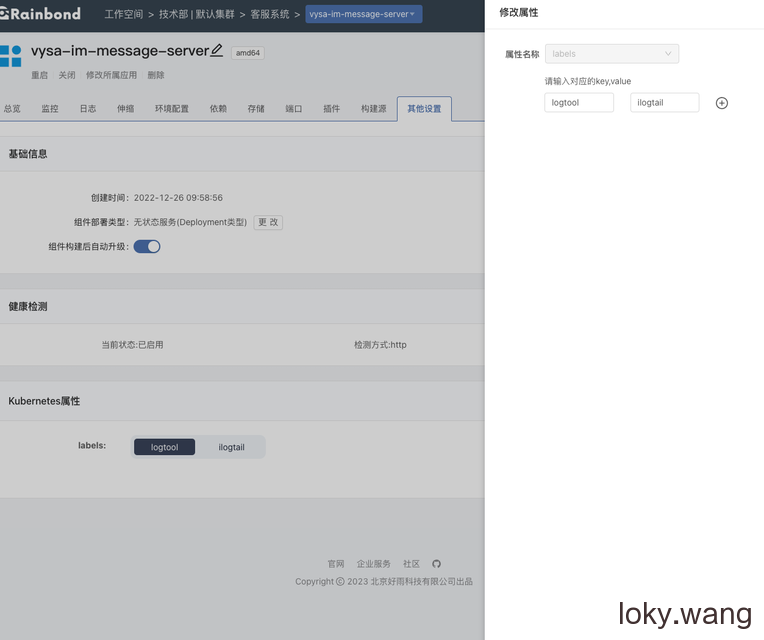
K8s中添加属性标签
添加key-value标签
logtool—ilogtail 用于表示是否采集